-
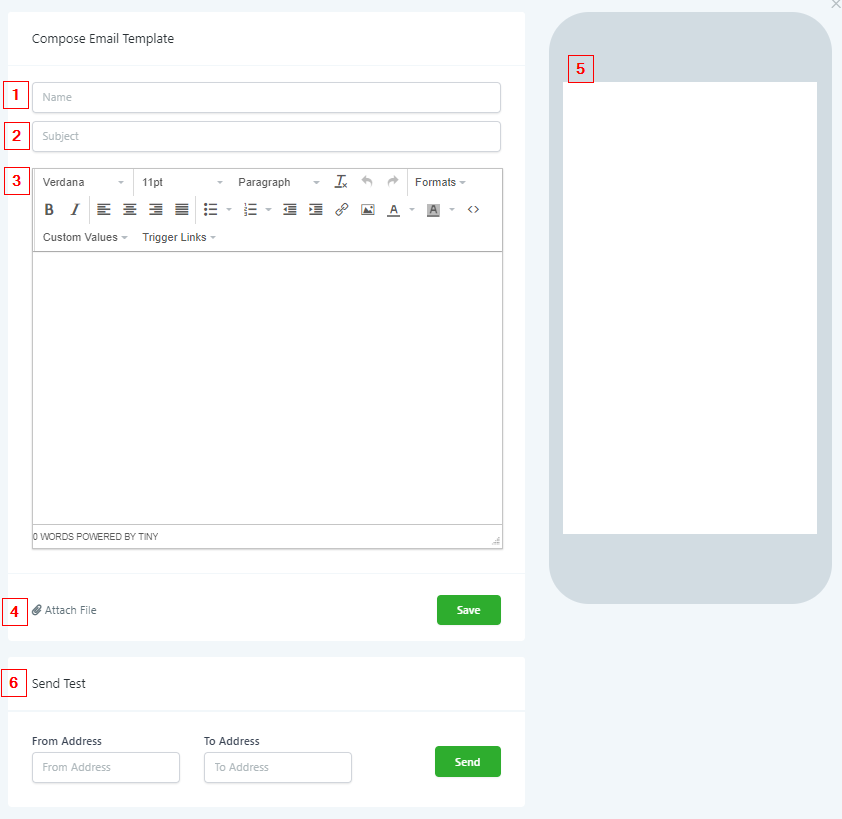
Name TemplateYour template will need a name. Again, remember that naming conventions are very important when you or someone from your team is trying to find a specific template to send to a lead or customer.
-
Add Subject LineGive your email template a subject line here.
-
Create Email TemplateIn this body section, you can create your email templates!
-
Attach Files To EmailYou can attach files from your computer to your email templates by clicking here.
-
Mobile Email Template PreviewAs you create your email template, you can preview what it will look like on a mobile device to your leads or customers by clicking the preview window here!
-
Send Test EmailIf you want to test out your new email template, you can do so by entering a “From Address” and “To Address” and then by pressing “Send” here.