
How To Create New Opportunities
This is the section where you can create new opportunities from scratch. In most cases, you will be creating opportunities using automation, but it is important to know how to create them from scratch as well.
Opportunity Tab
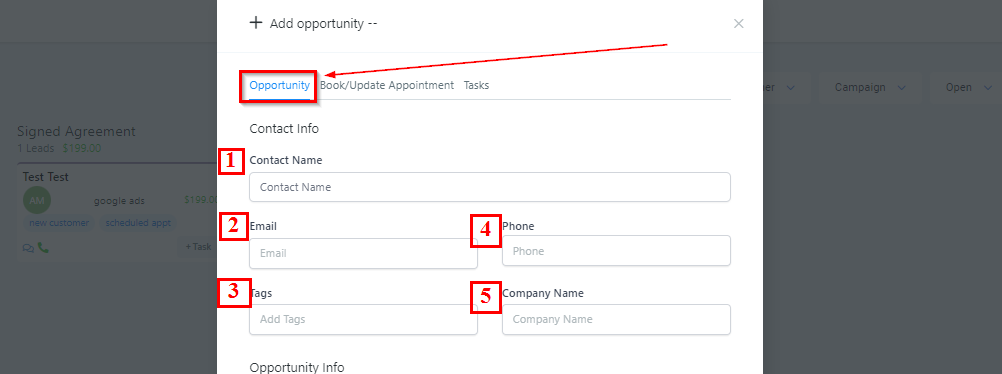
Contact Info
To create a new opportunity from scratch, you will use this panel.
-
1.Contact Name Add or edit this opportunity’s name.
-
2.Email Add or edit this opportunity’s email.
-
3.Tags Add or edit this opportunity’s tags. ****
-
4.Phone Add or edit this opportunity’s phone number.
-
5.Company Name Add or edit this opportunity’s company name.
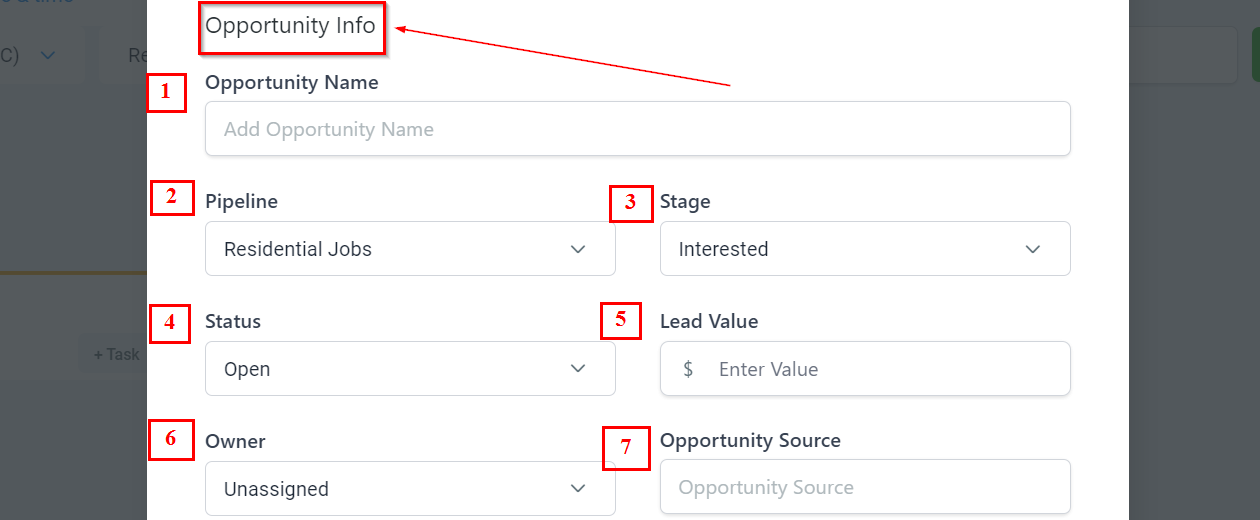
Opportunity Info
-
Add Opportunity NameYou will need to give your opportunity a name. This is usually the full name of the opportunity or company name.
-
2.Select PipelineHere you will select which pipeline you are allocating this new opportunity into. This is very important for organizational purposes and tracking data correctly throughout the pipeline.
-
3.Choose a Pipeline StageYou will need to assign the opportunity to a certain stage in your pipeline to show and track where they are at in the sales process.
-
4.Select StatusYou will need to assign the opportunity with a status. The status shows if the opportunity is still open, closed, or lost.