
Business Profile
Manage Profile Settings
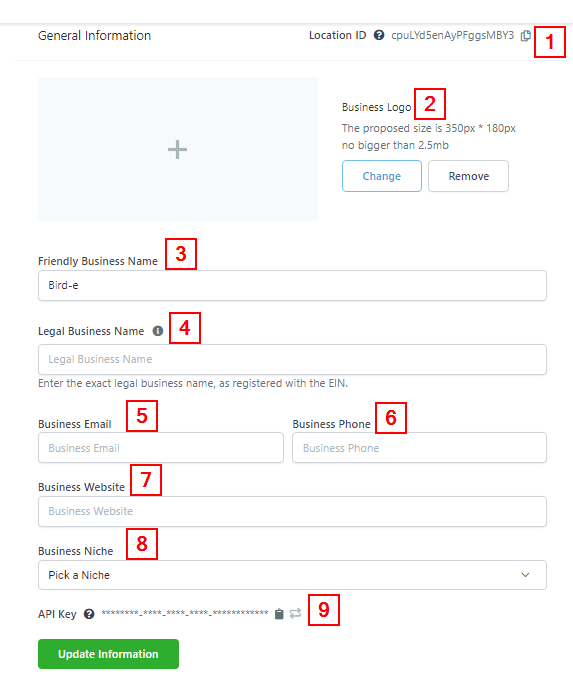
Here’s an overview of the company settings tab in your account settings management area.
NOTE: Depending on your user permissions, you may not have access to all of the components.
General Information
-
1.Location IDThis shows the current location ID of the company. You can copy the ID link by clicking on the “copy” icon.
-
2.Company LogoUpload, change, or remove a logo. Update, change or remove company information, including name, email, phone number, and website.
-
3.Friendly Business NameYou can set a username for each of your sub-accounts here.
-
4.Legal Business NameThis is where you enter your exact legal business name, as it is been registered with the EIN because this data will be used for future compliance registration.
-
5.Business EmailType in here your official business email address. truytykijnkhhiuy
-
6.Business PhoneType in here your official business phone number.
-
7.Business WebsiteYou can type in your business website here.
-
8.Business NicheYou select the niche your business belongs to.
-
9.API Key ****You can use this API Key for Zapier and API integrations. You can copy the ID link by clicking on the “copy” icon and you can also regenerate a new API key by clicking on the “Refresh” icon beside the “copy” icon.
Business Information
-
1.Business TypeYou can select the type of business you run; either a Sole proprietorship, Partnership, LLC, Co-operative, or non-profit Corporation.
-
2.Business IndustrySelect the industry category your company belongs to.
-
3.Business Registration ID TypeSelect the Government ID you would like to use in registering your company.
-
4.Business Registration Number